33 Canva Design Basics
A practical course that treats Canva design basics not as simple template editing, but as a core digital design skill connecting layout, typography, color, image editing, brand kits, presentations, social-media content, print materials, video design, and AI design assistance so non-designers can create practical visual content.
0. Purpose and ultimate goal
The ultimate goal is to help learners plan visual materials for clear purposes, critically select and customize templates, and produce content that considers brand consistency, readability, copyright, and distribution formats even without a design background. The course follows a professional training style centered on repeated Canva practice, design-principle application, social media card-news production, presentation design, print material production, brand-kit construction, Canva AI usage rules, and portfolio outputs.
Referenced professional training patterns
- Korean private digital-content and online-marketing courses using repeated card-news, thumbnail, and promotional design practice
- US/Canada productivity and marketing courses using Canva template customization, brand kits, and social-media content workflows
- UK/European vocational graphic design basics, presentation, print material, and brand-system project patterns
- Canva AI, Magic Design, Brand Kit, content calendar, and productized template portfolio outputs
Beginner 1 Day Canva Design Basics Curriculum
A one-day practical course for understanding Canva accounts, the editor, templates, text, images, elements, colors, and download features, then creating a simple card-news design and presentation cover.
| Category | Details | Practice methods |
|---|---|---|
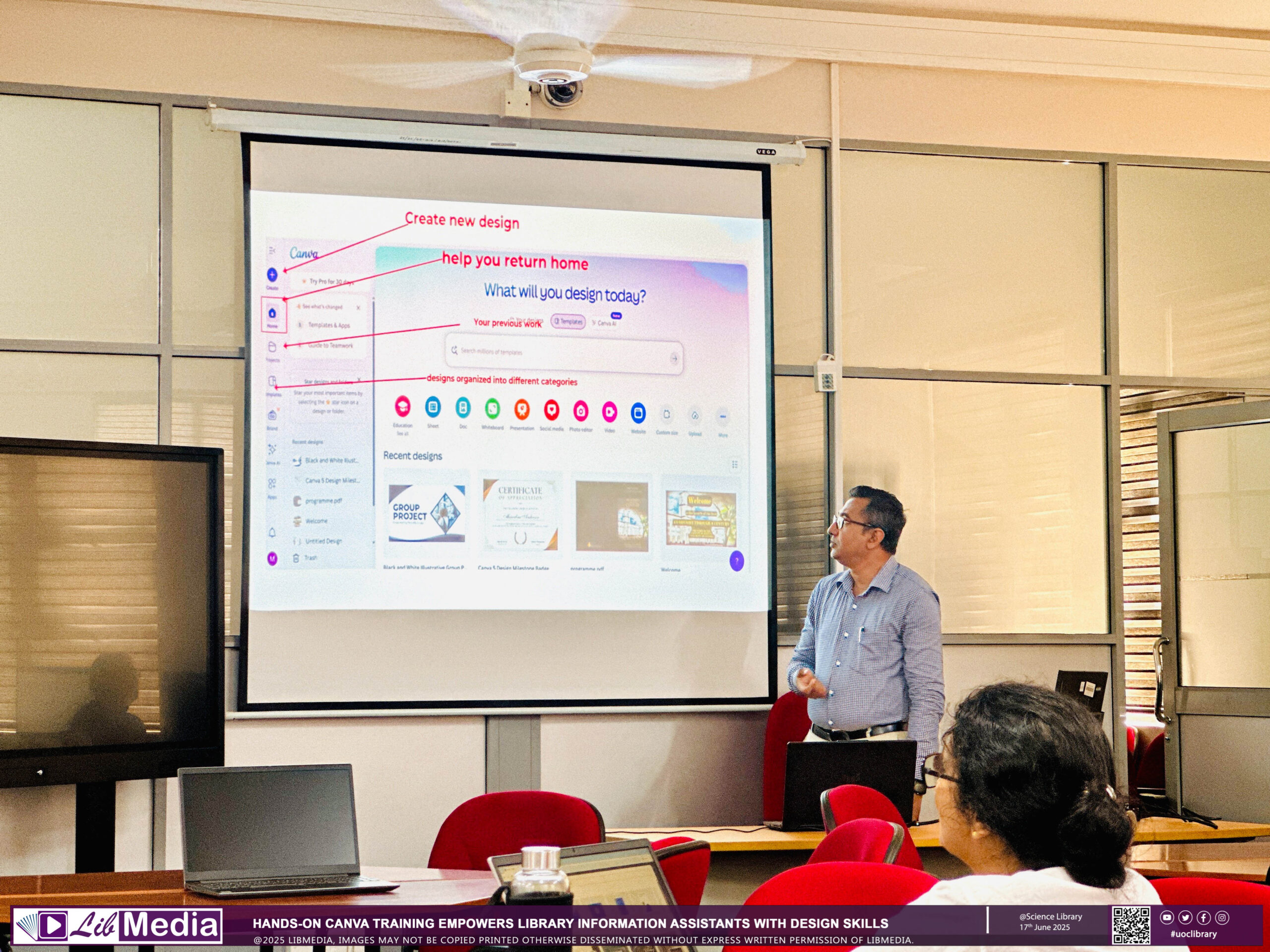
| Objective 1 | Understand Canva’s basic structure and design workflow. | Learners distinguish Canva account settings, home screen, template search, design-size selection, editor, page panel, elements, text, uploads, and apps using real interface examples. Learners compare free and Pro features, template licensing, share links, editing permissions, comment permissions, and download formats, then write a usage checklist. |
| Objective 2 | Customize templates using basic design principles. | Learners analyze existing templates using alignment, spacing, contrast, repetition, visual hierarchy, and readability, then fix poor placement and text sizes. Learners rebuild the first page of a card-news design using text styles, font pairing, color palettes, element search, photo filters, and background-removal examples in Canva. |
| Objective 3 | Produce simple practical design outputs. | Learners choose one output such as an Instagram post, event flyer, presentation cover, or YouTube thumbnail, define purpose, audience, copy, and visuals, then complete it. Learners compare PNG, JPG, PDF, and MP4 downloads, then practice export settings for web posting, printing, and presentation use. |
| Platforms | Canva Web, Canva Desktop, Canva Mobile, Canva Templates, Canva Elements, Canva Text, Canva Uploads, Canva Photos, Canva Brand Kit cases, and PNG/JPG/PDF download |
|---|---|
| Instructor profile | Instructor should have at least 2 years of Canva-based design and digital-content training experience and be able to teach layout, color, typography, template customization, copyright, and export formats to non-designers. |
| Target learners | Students, college learners, job seekers, entry-level employees, general citizens, small-business owners, freelancers, non-designers, and Canva beginners |
| Duration | 4-6 hours |
| Materials | Laptop or tablet, smartphone, internet, Canva account, practice copy samples, logo/photo samples, card-news planning sheet, and copyright checklist |
| Deliverables | Canva feature map, template analysis sheet, one card-news design, one presentation cover or thumbnail, and two exported files |
| Assessment | Feature understanding 20%, design-principle application 30%, output completeness 30%, copyright and export settings 10%, participation 10% |
Beginner 3 Days Canva Design Basics Curriculum
A three-day course connecting Canva templates, brand kits, social-media formats, presentations, and print-design features to create a practical promotional content package.


| Category | Details | Practice methods |
|---|---|---|
| Objective 1 | Create a basic design set with brand consistency. | Learners understand Brand Kit concepts and create a mini style guide by defining logo, primary color, secondary color, heading font, body font, and photo style. Learners use Canva Brand Kit, Styles, Color Palette Generator, Font Pairing, and Uploads to create three posts with the same brand tone. |
| Objective 2 | Create social-media content and promotional materials. | Learners choose three formats among Instagram posts, stories, YouTube thumbnails, blog hero images, and banners, then adapt the same message for each platform. Learners choose a flyer, poster, business card, or A4 notice template and adjust print margins, text size, QR code, and contact placement. |
| Objective 3 | Complete a presentation by applying collaboration and feedback. | Learners build a Canva presentation with cover, table of contents, problem, solution, examples, results, and closing slides, then write speaker notes. Learners use share links, comments, mentions, edit permissions, duplicate versions, and team folders to apply peer feedback and export final versions as PDF and PPTX. |
| Platforms | Canva Web, Canva Brand Kit, Canva Styles, Canva Presentations, Canva Docs, Canva Whiteboard, QR Code App, Google Drive integration cases, and PDF/PPTX/MP4 downloads |
|---|---|
| Instructor profile | Instructor should have at least 3 years of Canva content production, brand design, and presentation training experience and be able to teach social-media formats, print materials, and collaborative feedback. |
| Target learners | Student project teams, college learners, job seekers, entry-level employees, small-business owners, beginner marketers, freelancers, and learners who need online promotion |
| Duration | 12-18 hours |
| Materials | Laptop, smartphone, internet, Canva account, brand sample materials, promotional copy samples, presentation planning sheet, print-material checklist, and team feedback form |
| Deliverables | Mini brand guide, three social posts, one print promotional material, one presentation, and feedback revision log |
| Assessment | Brand consistency 25%, platform adaptation 25%, print output completeness 15%, presentation 25%, team feedback 10% |
Beginner 1 Week Canva Design Basics Curriculum
A one-week practical course expanding Canva into content planning, social-media operations, video-style design, educational materials, and AI-assisted design.


| Category | Details | Practice methods |
|---|---|---|
| Objective 1 | Build a workflow from content planning to design production. | Learners write a content planning sheet covering audience, purpose, key message, CTA, channel, upload schedule, and required images/copy. Learners use Canva Docs, Whiteboard, and Content Planner to create a monthly content calendar and design production checklist. |
| Objective 2 | Create card-news, short-form video, and educational materials. | Learners create a card-news design of at least five pages using problem, key information, example, and action prompts while unifying color, fonts, and spacing. Learners use Canva Video, Animations, Audio, Text Effects, and Beat Sync examples to create a 10-20 second promotional or reels-style video. |
| Objective 3 | Apply Canva AI and copyright standards safely. | Learners use Magic Design, Magic Write, Text to Image, Background Remover, and Magic Eraser examples to create drafts, copy, and image edits, then review manually. Learners distinguish usage scope and attribution rules for Canva elements, photos, music, fonts, AI-generated images, and uploaded external images, then write a copyright checklist. |
| Platforms | Canva Docs, Canva Whiteboard, Canva Content Planner, Canva Video, Canva Animations, Magic Design, Magic Write, Text to Image, Background Remover, Magic Eraser, and Beat Sync |
|---|---|
| Instructor profile | Instructor should have at least 3 years of Canva-based social content, video-style design, and AI design-assistant training experience and be able to teach content planning, copyright, and AI output review procedures. |
| Target learners | Middle and high school project teams, college learners, entry-level employees, startup teams, education administrators, small-business owners, freelancers, and online content creators |
| Duration | 20-30 hours |
| Materials | Laptop, smartphone, internet, Canva account, Canva AI-enabled environment, content planning sheet, brand sample materials, music/copy samples for video, and copyright checklist |
| Deliverables | Monthly content calendar, card-news design of at least five pages, one reels-style video, one educational material, and Canva AI usage log |
| Assessment | Content planning 20%, card-news completeness 25%, video-style design 20%, AI usage and review 20%, copyright check 15% |
Intermediate 4 Weeks Canva Design Basics Curriculum
A four-week practical course expanding Canva into team brand operations, campaign content production, education/promotion packages, template systems, and performance-report materials.


| Category | Details | Practice methods |
|---|---|---|
| Objective 1 | Design an organizational Canva brand and collaboration environment. | Learners design Canva Team, Brand Kit, Brand Templates, Team Folders, sharing permissions, and approval flows by team, project, and campaign. Learners diagnose brand misuse cases such as color inconsistency, mixed fonts, distorted logos, and low-resolution images, then write a brand operation manual. |
| Objective 2 | Create a campaign design package. | Learners choose one promotional campaign and create a connected design set including poster, card-news, banner, short-form video, presentation, and application notice image. Learners use Canva Resize, Animation, Video Timeline, Mockups, Charts, QR Code, and Apps to convert the same message into online and offline formats. |
| Objective 3 | Create a template system and performance-report materials. | Learners create reusable templates for card-news, lecture materials, notices, reports, and thumbnails by separating locked elements from editable areas. Learners use Canva Charts, infographic templates, and Google Sheets integration examples to build performance-report slides visualizing views, engagement, registrations, and satisfaction results. |
| Platforms | Canva Teams, Canva Brand Kit, Brand Templates, Team Folders, Canva Resize, Canva Video Timeline, Canva Mockups, Canva Charts, QR Code App, and Google Sheets integration cases |
|---|---|
| Instructor profile | Instructor should have at least 4 years of Canva team collaboration, brand system, and campaign content training experience and be able to teach template systems, performance-report design, and brand operation manuals. |
| Target learners | Employee upskilling learners, team leads, education administrators, marketers, small-business teams, digital instructors, content operators, and Canva team managers |
| Duration | 40-60 hours |
| Materials | Laptop, internet, Canva team practice account, brand scenario, campaign plan, logo/color/font materials, performance data sample, and template planning sheet |
| Deliverables | Organizational Canva brand operation system, campaign design package, template set, performance-report slides, and brand operation manual |
| Assessment | Brand system 25%, campaign package 30%, template structure 20%, performance visualization 15%, operation manual 10% |
Advanced 8 Weeks Canva Design Basics Curriculum
An advanced project course connecting Canva design basics to brand-content consulting, training-product design, template productization, AI design workflows, and portfolio building.


| Category | Details | Practice methods |
|---|---|---|
| Objective 1 | Diagnose a Canva-based design operation environment and design improvements. | Learners select a fictional academy, education institution, small-business brand, nonprofit, or startup and diagnose issues in content purpose, brand consistency, production speed, copyright, and approval flow. Learners write a diagnostic report based on unclear messaging, duplicate templates, visual inconsistency, low-resolution exports, AI overuse, and missing performance tracking. |
| Objective 2 | Build Canva template productization and AI design workflows. | Learners choose education materials, SNS packages, brand kits, lecture materials, promotional materials, or thumbnails and create a template set suitable for sale or distribution. Learners combine Magic Design, Magic Write, Text to Image, Background Remover, Translate, and Resize to create a planning-draft-review-revision-distribution workflow. |
| Objective 3 | Build a Canva design training product and portfolio. | Learners design Canva curricula for beginners, students, employees, instructors, small-business owners, and marketers with session-level objectives, activities, and assessments. Learners build a Canva Website or PDF portfolio integrating the diagnostic report, brand guide, campaign package, template product, AI rules, training materials, and assessment rubrics. |
| Platforms | Canva Teams, Canva Brand Kit, Brand Templates, Canva Website, Canva Docs, Canva Presentations, Canva Video, Magic Design, Magic Write, Text to Image, Background Remover, Translate, Resize, and Content Planner |
|---|---|
| Instructor profile | Instructor should have at least 5 years of Canva consulting, brand content, template productization, and AI design-assistant training experience and be able to develop design training products and operate portfolio-based projects. |
| Target learners | Digital instructor training learners, HR and training managers, marketers, education institution operators, startup teams, beginner workflow consultants, and internal Canva trainers |
| Duration | 80-120 hours |
| Materials | Laptop, internet, Canva Pro or Teams practice account, Canva AI-enabled environment, brand diagnostic scenario, template product plan, content performance data, training-product design form, and portfolio template |
| Deliverables | Canva design diagnostic report, brand improvement strategy, AI design workflow, productized Canva template set, target-specific curriculum plan, and Canva Website or PDF portfolio |
| Assessment | Diagnostic report 20%, brand strategy 20%, template productization 20%, AI workflow 15%, training-product design 15%, portfolio presentation 10% |